
There are times when items in my Mac Museum cross over and provide function in my real life. One example is the Mac mini I bought as a backup server – I didn’t have the 2010 design in my collection yet and I actually use it for regular tasks. It runs the Backblaze client on macOS 12 Monterey to back up my RAIDs to the cloud. It can’t run anything newer than its 2021 OS, but it works fine for my purposes and was supported with security patches until just recently. I picked it up for $109 almost two years ago, but the configuration I chose leaves a bit to be desired. Its 1.4 GHz dual core Intel i5 is nothing to write home about, but its 4 GB of non-upgradeable memory is the bigger issue. The mini can do the job, but it’s sluggish so I’ve kept my eye open for something a bit faster that could run a newer, OS that’s still supported.
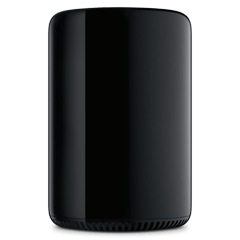
I’ve been eyeing Apple’s 2013 Mac Pro for some time now, but the prices have been too high to justify, selling for over $400 a couple years ago. I recently found one at OWC for under $200 and decided it would make a good replacement for my mini. Not only is the Pro new to my collection, it offers more options than the mini: namely more cores and user upgradable memory. It can’t officially run a newer version of macOS, but OCLP (Open Core Legacy Patcher), allows it to run Sonoma or even Sequoia.
The Story of the 2013 Mac Pro
The 2013 Mac Pro was released two years after Steve Jobs died, at a time when Apple’s ability to innovate without him was constantly questioned. The Mac Pro was popular, but still used an evolution of 2003’s G5 design and was the only Mac that had seen a design refresh since the Intel migration in 2006. This drove Apple to launch a machine that was a radical departure from anything the industry had seen, introduced by Phil Schiller’s famous quote: “Can’t innovate anymore, my ass!”
The new Mac Pro was the polar opposite of its predecessor – a shiny aluminum cylinder, similar in size to a container of protein powder, with dual graphics cards, super fast flash storage, but also no expansion slots, no spinning drives, no room for additional storage. Intel’s latest Xeon, offered in configurations ranging from 4 to 12 cores, provided a performance boost over the previous model, and the single stick of flash storage provided a huge speed boost across the whole machine. The design was sleek, but polarizing, being compared to a soda can or a trash can. The system was cooled by a single fan that was extremely quiet in comparison to the multiple fans running through the old Pro. This was a machine that looked like it had come from space, one that you wanted to show off by putting it on top of your desk instead of under it.
Despite this, the new Mac Pro was polarizing: the lack of internal expansion driving everything to the six Thunderbolt 2 ports on the back. If you wanted extra storage you had to deal with extra drives and cables. If you wanted to install an expansion card, you needed to add an external Thunderbolt PCIe expansion chassis and more cables. Suddenly your minimal object of art is a rats nest of cables and boxes, harkening back to the Apple II with all of its floppy drives stacked on the desk.
A Familiar Story
The new Pro echoed another product from Apple’s past. One that packed high-performance into a small, elegant package. One that couldn’t find its position in the market and was canceled after one year. One that was launched under the extremely innovative Steve Jobs: the G4 Cube.
The two machines share a lot in common: they are small, their designs unique, they have no internal expansion, and they were targeted at Pro users. The G4 Cube was notorious for its cooling problems; its fan-less convection proving ineffective at keeping it’s hot CPU humming along appropriately. Cubes could run so hot they’d lock up and shut down at random.

Apple made a big deal about the Mac Pro’s “thermal core” which uses a large shared heatsink to draw heat from the CPU and dual GPUs with single pulling air through the bottom and exhausting it through the top. The thermal core seems to live up to its promise, but quickly became a bottleneck: the Pro is one of the only Mac models to never see any major spec upgrades in its six years on the market. After a couple years of stagnation an iMac could out perform many of the Mac Pro configurations for a significantly lower price. Apple admitted in 2017 that the design could not adequately cool the combination of next generation graphics and CPU that it would have needed for its next revision. This led to the 2017 iMac Pro and a replacement with a more traditional tower design in 2019.
Two polarizing machines with unique industrial designs targeted at pros. The Cube failed due to an ineffective design and questionable placement in Apple’s product line against the less expensive Power Mac G4. The 2013 Mac Pro had the advantage of being the highest-performance model in Apple’s lineup for a time, but became a joke of the industry at the end. Both are rare cases of big Apple mistakes, unique one-off designs that are or will be collectors items.
My Pro
I purchased the second tier configuration in the 2013 Mac Pro lineup – one with a six-core 3.5 GHz Xeon CPU, dual AMD Fire Pro D300 GPUs with 2GB memory each, 16 GB RAM, and a 256 GB SSD. This configuration would have sold for $3,000 – $3,500 in 2013. I paid $190 eleven years later. That’s a discount of 95%!
I’m excited to have one in my collection and I’ve been tracking prices for a long time. I bought mine from OWC, just like the Mac mini it’s replacing, because the price was similar to eBay while including a warranty and a reputation I trust. As every review has stated, its cylindrical shape does stand out, looking like a sculpture or alien object. It isn’t black, but one of Apple’s many “space gray” shades that looks different depending on the lighting it’s in.
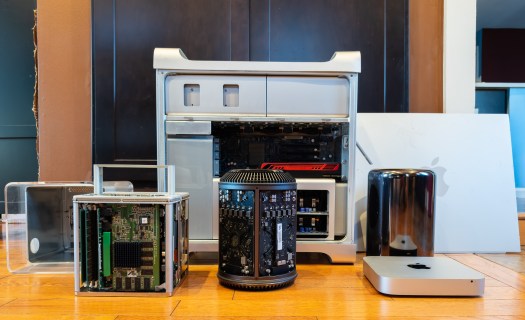
It’s certainly not as tall as a full Mac Pro tower or my PC tower, but it’s taller and heavier than I expected. In fact, it’s almost exactly as tall as a G4 Cube and 4x the weight of my mini. I don’t want to stress out the motors on my standing desk, so it will have to live somewhere else. Good thing I have long cables.
The top is a vent, but also a handle, which is cleverly hidden. It’s easy to use – just curl your fingers under the edge and pick it up. It’s not sharp like the handles on the tower-style Mac Pros, which I’ve jammed my hand under and cut before. Getting inside the machine is easy too: slide a single switch in the back and pull the entire outer shell off, exposing the thermal core, two graphics cards, SSD, and memory slots. The circuit boards are black, the components are organized, and the whole thing is industrial-looking; it reminds me of the inside of Darth Vader’s helmet.

During operation it runs as silently as the reviews promise – I ran a few backups, software installs, and Geekbench benchmarks and barely heard the fan. I could feel the air coming out of it, but I could’t hear it unless I put my ear to it. It never got anywhere near as loud as my 15″ MacBook Pro with a Core i9 was all the time. The outer case gets a little warm after use, but, again, not nearly as warm as an Intel MacBook Pro. While Apple may have hit a wall with future upgrades within the design, it at least handles its release configuration far better than the G4 Cube ever did.
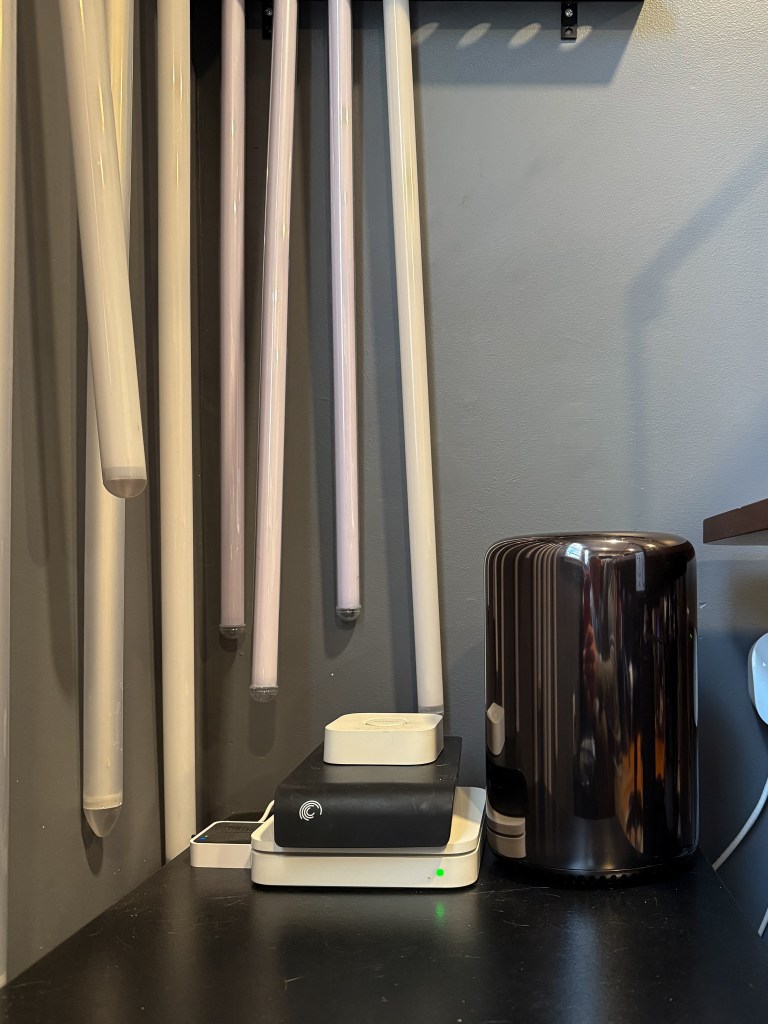
Performance is really good too. I used OCLP (Open Core Legacy Patcher) to install macOS 14.7 Sonoma, which until a month ago, was the current release of macOS. Sonoma is two years newer than the Mac Pro’s last officially supported OS and it runs great. It’s snappy and responsive, and graphics acceleration even works. It’s an immediate difference from the mini it replaced. Technically I could have used OCLP to upgrade the mini to Sonoma as well, but I doubt its dual cores and 4 GB RAM would have handled it. The 16 GB RAM and six cores in the Pro will.
Until Next Mac
I’m happy to have a 2013 Mac Pro in my collection. It’s such a unique machine with an interesting history and I’m glad I can actually put it to work for a practical purpose. At some point I’ll probably buy another, maxed out with 12 cores, 64 GB RAM, and the highest-end FirePro 700 GPUs. I’ll do it when they’re even cheaper then they are now, just because. In a couple years I’ll probably replace the Mac Pro with another mini – either a 2018 Intel model or an M1 depending on what the prices are. The 2018 Intel model significantly outperforms the Pro in single core performance and can match or exceed even the 12-core Pro in multicore. The M1 blows both of them away. But that’s in the future. For now, my backup solution is all Pro.
 Relatively Ambitious
reas this interesting Page. Is possibile to use opencore to step a 6.1 to Ventura ? No problem at all ?
LikeLike
Yes, it should be possible to upgrade to Ventura instead.
LikeLike