

A note about the image above: this image was generated using WordPress’s AI features. It “read” my post and generated an image to go with it. I have to say I’m impressed. At a glance, it looks very much like my MacBook Pro. The shape of the hardware, the layout of the interface on the screen, and even the UI are pretty close. Just don’t look at the details – the text, the icons, the four window controls. Still not bad for 2 seconds and one mouse click.
My M4 Max MacBook Pro arrived before the holiday and I’ve been using it for about a month now. Since the two machines are nearly identical from a design perspective there isn’t much to review. Yes, the Space Black color is noticeably darker than Space Gray. No, it isn’t black. Yes, the MacBook Air’s Midnight is darker but captures more finger prints. Yes, I’m glad I got it. Ok, biggest difference is out of the way. Now onto the biggest difference – performance.
Specs Comparo
| M4 Max MBP (New) | M2 Pro MBP (Old) | |
|---|---|---|
| CPU Cores (Efficiency / Performance) | 16 (4E / 12P) | 12 (4E / 8P) |
| GPU Cores | 40 | 19 |
| Neural Engine (ops / sec) | 38 trillion | 15.8 trillion |
| Memory | 48 GB | 32 GB |
| Memory Bandwidth | 546 GB/s | 200 GB/s |
| Storage | 4 TB | 2 TB |
| Connectivity | Thunderbolt 5 (up to 120 Gbps, 240W) | Thunderbolt 4 (up to 40 Gbps, 140W) |
General Performance, Power Consumption, and Battery Life
Any Mac of the Apple Silicon era provides great everyday performance, all the way back to the M1 models release in 2020. It’s nearly impossible to tell the difference when booting, browsing the web, watching videos, listening to music, checking email, or performing general productivity tasks. Power consumption and battery life are very similar to my M2 Pro – I only hear fans when running intensive editing and AI workloads and the battery lasts hours and hours and hours. I thought I’d see a drop with the extra CPU cores, GPU cores, and brighter screen, but it’s been negligible if anything.
Formal Tests
I use “formal” a bit loosely here. If you are looking for exhaustive tests that average multiple runs across fresh boots, you’re best looking at reviews from other folks. My tests are single runs focused on the tools that I use just to get an idea of the difference. I don’t care if they are a few seconds off. That said, I tried to make things as comparable as possible across the two machines. All tests were performed on macOS Sequoia 15.2 with all applications closed except Safari. The same application versions were installed on each machine.
Geekbench 6.3.0
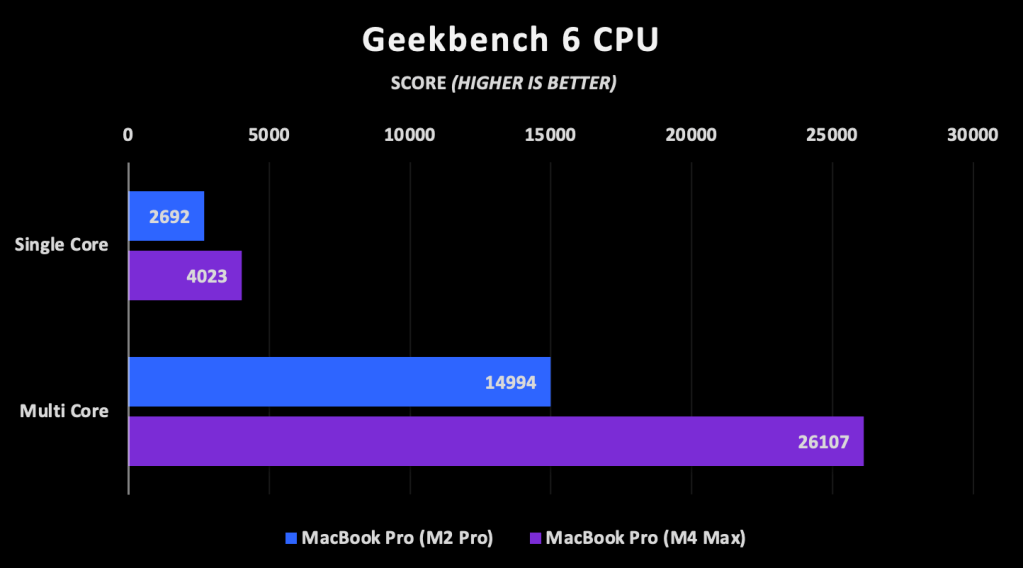
While synthetic benchmarks like Geekbench don’t always bear out in the real world, they’re a good baseline to measure from. The raw performance numbers bear out as expected: the M4 Max is about 50% faster in single core and 74% faster in multi core performance. The M4 Max GPU configuration is a little over twice as fast, which is good since it has twice as many cores and is based on a more advanced architecture.

Lightroom Classic 14.1.1
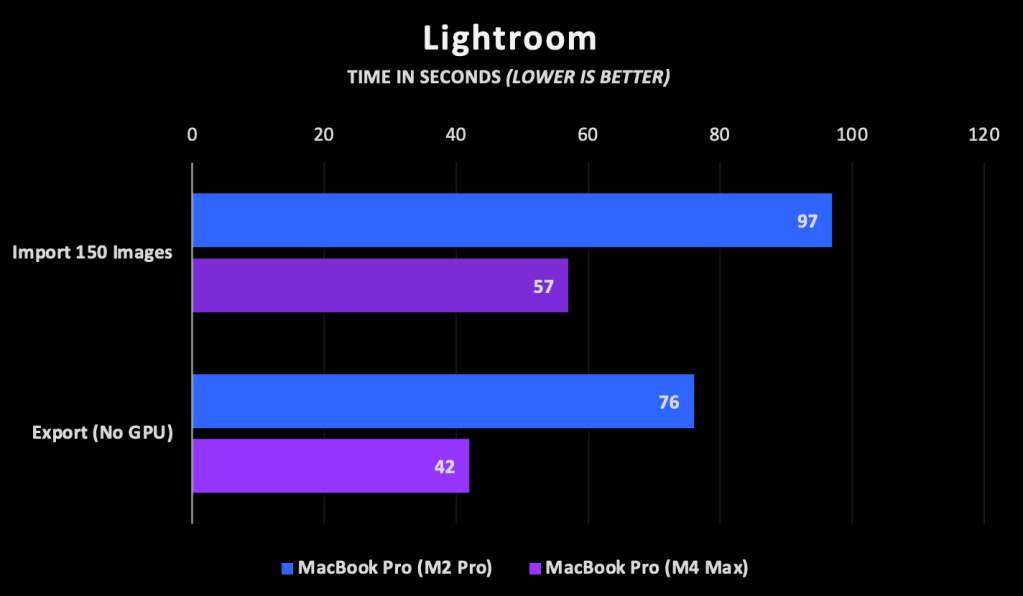
Editing photos in Lightroom Classic is the most common way I push my hardware to its limits, so this test shows some of the real-world improvements I’ll see. As the M2 Pro is already a very powerful SOC, I’m not in need of any major boosts here, but it’s nice to see Lightroom imports and exports taking 41% and 44% less time respectively. That will improve my workflow when I’m dumping hundreds of soccer photos in after a game.
I haven’t done much editing yet and didn’t measure it, but the couple of things I did were very responsive. I had no issues with my M2 Pro, but I had a moment of “did I even click that?” happen on the M4 Max. This will be a great editing machine.
DXO PureRAW 4.7
I skipped the Max with extra GPUs for my M2 thinking that I wouldn’t benefit from them. I regretted that decision a bit when it came to AI-based tasks. While Apple’s Neural Engine can make up for a weak GPU configuration it can’t completely replace one, especially for many AI workloads that are not optimized for Apple’s APIs. That was part of the reason for choosing an M4 Max this time around – it not only provided more performance CPU cores, but I expected to benefit from the extra GPU cores as well.
DXO PureRAW is an AI-based denoising tool I use quite frequently and it supports both the Neural Engine and Apple’s GPUs, which makes for a very interesting comparison.
Running 88 45 MP images through Pure RAW’s latest PRIME XD2s noise reduction model took 25% less time on my M4 Max using the Neural Engine than it did on the M2 Pro. That makes sense, though isn’t quite twice the performance that marketing would indicate. AI workloads can vary quite a bit in terms of how they perform against “ops per second” metrics, so a 25% reduction instead of a 50% reduction isn’t that surprising.
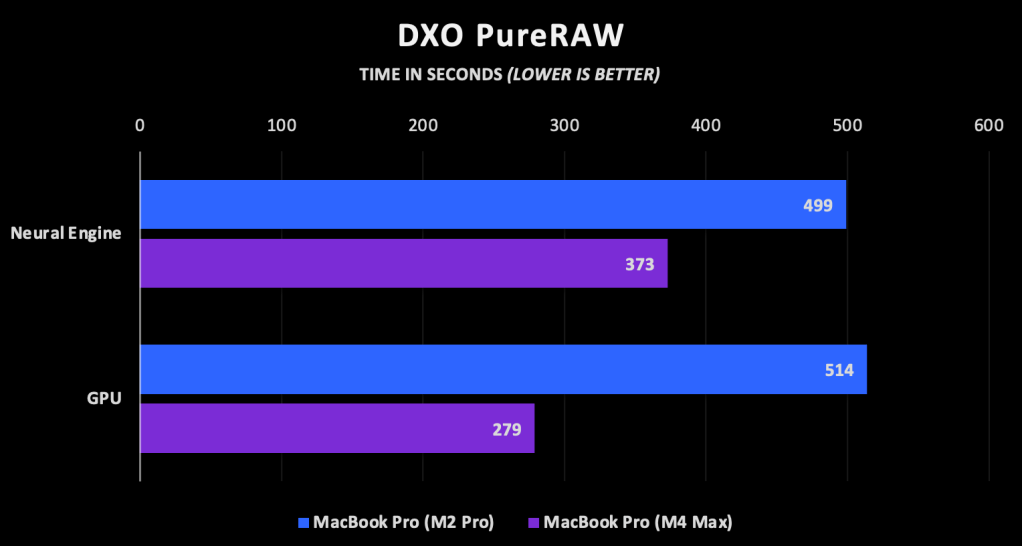
Running the same test using the GPU, the M4 Max performs the same operations about 46% faster than the M2 Pro, which is nearly a 2x improvement. This is where things get interesting with the Neural Engine. On the M2 Pro, the Neural Engine is about 3% faster than the GPU. It’s minimal, but on weaker hardware like my old M1 MacBook Air, it really saved the day. On the M4 Max however, the GPU is still king – de-noising the images about 25% faster than the Neural Engine can. I’m glad I ran that test because Pure RAW’s “automatic” setting selected the Neural Engine on my M4 Max.
The benefit of the Neural Engine, of course, is power usage. While it may be a slower than my GPU, it uses far less power. When using the Neural Engine, my M4 Max never became warm and the fans never turned on. With all 40 GPU cores cranking at full blast my Mac was hot and loud. It only lasted for about five minutes, but the Neural Engine is a much better choice if battery life and noise are concerns. It’s pretty impressive that there’s only a 25% delta between the two actually.
LLM, Transcription, & General AI Benchmarks
I replaced some of my video tests with something I plan to do more often, which is play with AI models running locally on my machine. For these tests I ran Meta’s Llama 3 model, Open AI’s Small Whisper audio transcription model, and a benchmark with Geekbench AI.
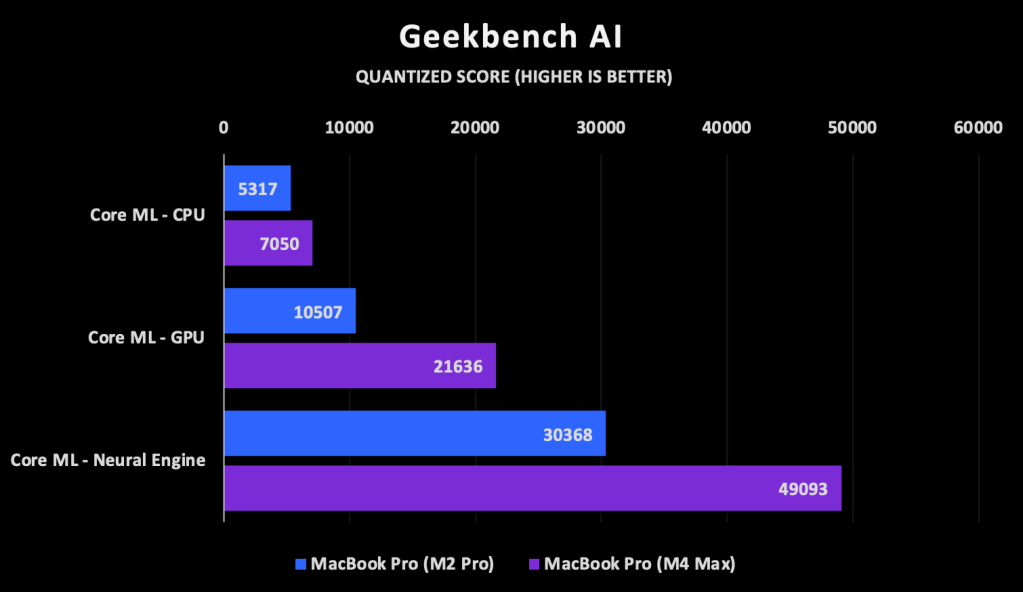
Similar to Geekbench for the CPU and GPU, Geekbench AI is intended to test a range of synthetic workloads to facilitate comparison between machines across platforms. It scores across single precision, half precision, and quantized models; I chose the quantized values for simplicity. The M4 Max was 30% faster than the M2 Pro when using the CPU, more than twice as fast when using the GPU, and 60% faster when using the Neural Engine.
Moving to a more realistic workload, I installed Meta’s open source Llama 3 model trained on 8 billion parameters and compressed using 4 bit quantization. Think of it as running something similar to ChatGPT right on my Mac. It’s an older version of the model from April of last year, but it only requires 16 GB RAM, easily fitting into the memory of both of my machines. It’s quantized to 4 bits, which compresses the model to reduce its memory footprint while improving its speed.
I asked it questions about amendments to the Constitution using LM Studio, which provides handy metrics that I averaged together. In terms of speed, the M4 Max generated the first token of the response almost three times faster and continued generating tokens at over twice rate as the M2 Pro. This test ran completely on the GPU and shows the power of the improved GPU architecture and significant increase in cores.
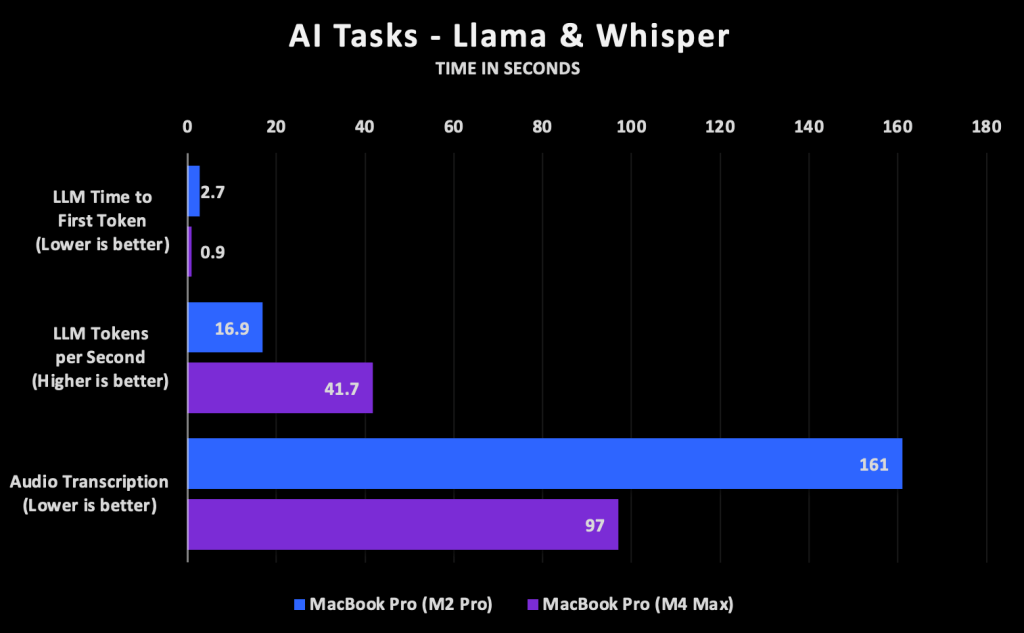
I also ran a transcription test using Mac Whisper which leverages OpenAI’s free Whisper model to convert audio to text. I loaded a 1 hour and 21 minute video and transcribed it using the 500MB Small model. This was also a GPU-bound task and the M4 Max completed it 39% faster.
Emulation
What better way to test the performance of a machine than by running a benchmark while emulating a totally different CPU architecture. What? It makes total sense to me because I use UTM and QEMU to emulate PowerPC systems running Mac OS 10.5 and earlier, because y’know, vintage. I ran Geekbench 2 on Mac OS 10.4 through UTM on my M2 MacBook Pro, my M4 MacBook Pro, and also ran it on my real college-era 1.33 GHz PowerBook G4.
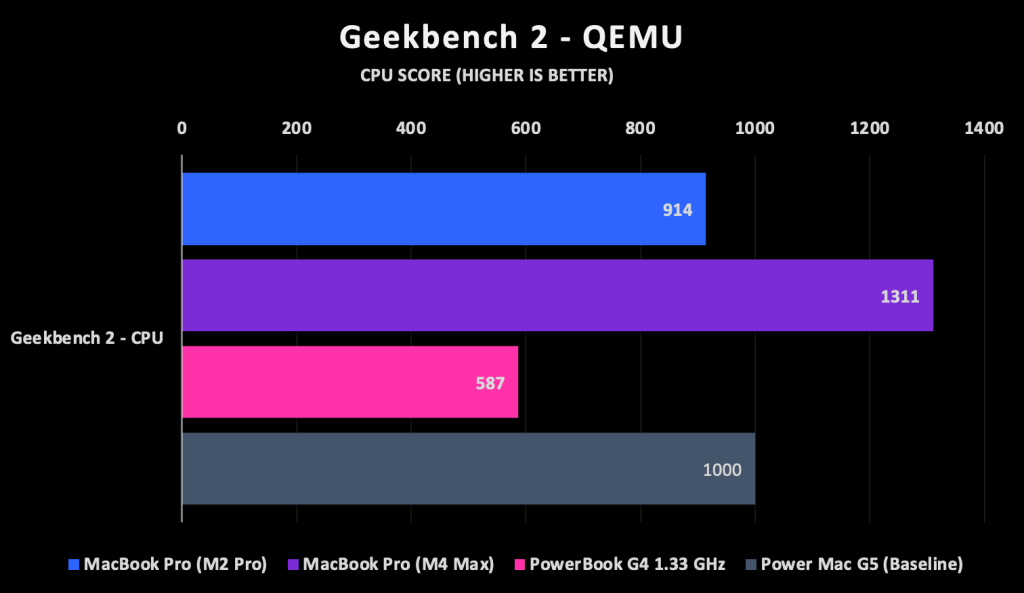
I expected the M4 to win due to its significantly faster single core performance, and it did, by about 43%. What was even more interesting was how much better both machines were than real hardware. My real G4 PowerBook came in with a score of just 587, only about 64% of the performance of my M2 Pro and 45% of the performance of my M4 Max. In Geekbench 2, a score of 1000 equates to a 1.6 GHz PowerPC G5. My G4 PowerBook is half a G5, my M2 Pro under emulation is a G5, and my M4 Max under emulation is more than a G5. Pretty cool.
A Satisfactory Upgrade
All in all I’m happy with my new M4 Max. It’s familiar, has a few creature comforts, and will easily meet my performance needs over the next two years. I’ll be very interested to see how my experience with Upgraded works out and what sort of hardware I’ll get on my next iteration. Current rumors point to separate and more powerful GPU modules in the M5 series and OLED displays in 2026 or 2027. Until then, I’ve got a great machine.
 Relatively Ambitious