
All of the hubbaloo around the Nikon Z8’s buffer being so much worse than the Z9’s made me want to test my cards with it. In practice, I don’t have any buffer issues because I only write to a single card and that card is an incredibly fast Delkin Black. I was curious how my other cards would affect the buffer though, just to know. I tested them in my D500 for reference to show how the two cameras differ. Here are the results.
The D500
My Nikon D500 shoots 20 MP images at 10 fps. It has a CF Express slot and an SD card slot and is known for having a pretty generous buffer. Regardless of card, the buffer reads “29” when the shutter button is held down. I tested it with my two CF Express cards and one SD card for reference to illustrate the experience I have with my previous sports and wildlife camera. All of these were shot at 10 fps in lossless compressed RAW. Some were shot with the lens cap on, while others were focused on something and shot without tracking. For this camera, it didn’t matter.
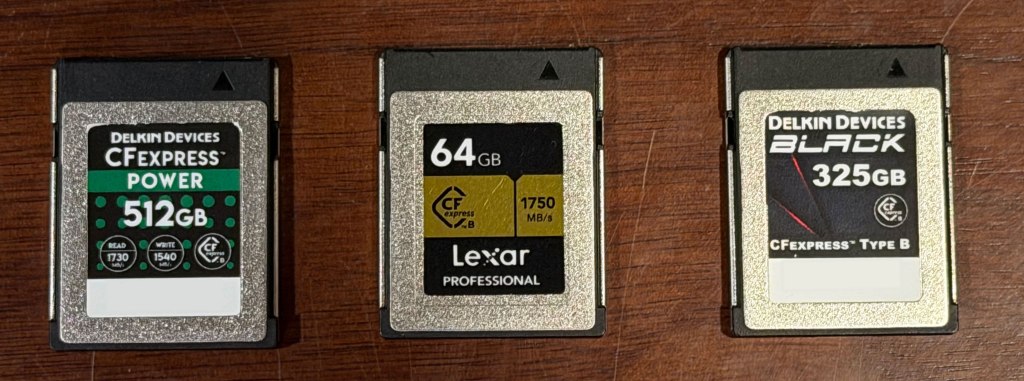
| Card | Type | Speed | Purchased | Price | Time Before fps Drop |
|---|---|---|---|---|---|
| Lexar Professional 64 GB | CF Express | 1000 MB/s max 800 MB/s sustained | May 2021 | $66 | 20 seconds until it hit 200 max images, buffer stayed around 17. Took five sets of 200 right after on another. Card a little warm. |
| Delkin Power 512 GB | CF Express | 1540 MB/s max 820 MB/s sustained | March 2023 | $170 | 20 seconds until it hit 200 max images, buffer stayed around 17. Took two sets of 200 right after on another. Got mostly into a fourth. Card barely warm. |
| Delkin Black 325 GB | CF Express | 1500 MB/s sustained write | March 2023 | $200 | Not tested |
| SanDisk Extreme Pro 64 GB | SD | 95 MB/s | April 2022 | $18 (used) | 4 seconds |
I originally used a Kingston SD card with 80 MB/s write speed in my D500 and didn’t really have any issues because I usually only take short bursts that last a few seconds. The idea of possibly not getting “maximum” performance eventually caused me to buy the Lexar card, which I’ve used since. I’ve never had any buffer issues with the D500, even with the SD card. In fact, I shot an entire soccer game with the SD card and never had an issue. The four seconds that the SD card allowed was plenty.
Knowing that a Z8 was coming and knowing that I needed a fast card, I purchased the Delkin Power from B&H during one of their daily deals. It doesn’t make claims about sustained write performance like the Delkin Black series, but I thought it would be good enough. A few days after the Z8’s release B&H put the Black series on sale and I couldn’t pass it up. I picked up a Delkin Black for $199, which is more than 50% off. I didn’t even test it in my D500 because that camera isn’t fast enough to stress it.
The Z8
The Nikon Z8 is a completely different beast. It’s pushing more than twice the pixels of the D500 at twice the frame rate. The buffer shows “21” when the shutter is pressed. I tested all of my cards at both 20 fps and 15 fps at all three file settings – Lossless Compressed, HE* RAW, and HE RAW.
Lossless Compressed is the setting I’m used to on my other Nikons. It’s the highest quality with no detail loss and creates files about 60 MB in size. HE* RAW is exclusive to the Z8/Z9 and is powered by their XPEED7 image processor. It’s “visually lossless”, even though some data is removed to create its 35 MB files. Reviews have shown almost that it’s incredibly difficult to see any negative effects from this removal, even with significant post processing. HE RAW (no asterisk) is a level below that, which does throw away some detail to get a 24 MB file, but reviews still show almost no difference from Lossless Compressed, even with heavy processing.
These were all shot with manual focus, ISO 500, and 1/500 second exposure. The Z8 displayed a buffer number of “21” at the start of each test for each card.
| Card | Type | Speed | Time Before fps Drop: Uncompressed RAW (20 / 15 fps) | Time Before fps Drop: HE* RAW (20 / 15 fps) | Time Before fps Drop: HE RAW (20 / 15 fps) |
|---|---|---|---|---|---|
| Delkin Black 325 GB | CF Express | 1530 MB/s sustained | 4s / 20+s (never below r17) | 13s / 20+s (never below r18) | Basically unlimited |
| Delkin Power 512 GB | CF Express | 1540 MB/s max 1320 MB/s sustained? | 2.1s / 3.5s | 3.5s / 8.8s | 10s / 20s+ (never below r18) |
| Lexar Professional 64 GB | CF Express | 1000 MB/s max 800 MB/s sustained | 3s / 15s | 8s / 20s+ (never below r18) | 24s / 20+s (never below r18) |
| SanDisk Extreme Pro 64 GB | SD | 95 MB/s | ~1 second | ~1 second | ~1 second |
The Delkin Black is one of the best cards on the market, and it shows. The buffer gradually moved from 20 to 15 and down over four seconds during the Uncompressed RAW test. At 15 fps its basically unlimited. Switching to HE* RAW increased the 20fps buffer significantly. Not only does HE* provide more buffer than I could imagine anyone ever needing, it also shoots faster once it’s saturated. At this rate, HE RAW isn’t even necessary, but I tried it anyway and it provided nearly a minute of continuous 20 fps shooting before slowing down.
The Delkin Power is a lower-end card with a much lower sustained write rate than the Delkin Black, and it shows. The Power delivers much lower performance with uncompressed RAWs (even at 15 fps) and suffers with HE* RAW as well. I can get by with 3.5s buffer in most cases, but this is the card that benefits significantly from the lossy HE RAW format. The Lexar card that I bought for my D500 fares much better at 15fps uncompressed RAW and provides a very usable buffer in HE* RAW.
Notes from the Present
I shoot almost exclusively in HE* RAW and after thousands of images and edits I have rarely encountered a scenario where I can tell the difference. It’s only in extreme cases where I need deep shadow or highlight recovery that I’ve ever wondered if uncompressed RAW would have been better. So in general, any of these cards, except the SD card, can meet my needs. Even during fast-paced sports I rarely hold the shutter down for more than 3 seconds.
 Relatively Ambitious