
I’ve had my iPhone 17 Pro and Apple Watch Series 10 for a half a year now. It’s about time for some reviews.
iPhone 17 Pro
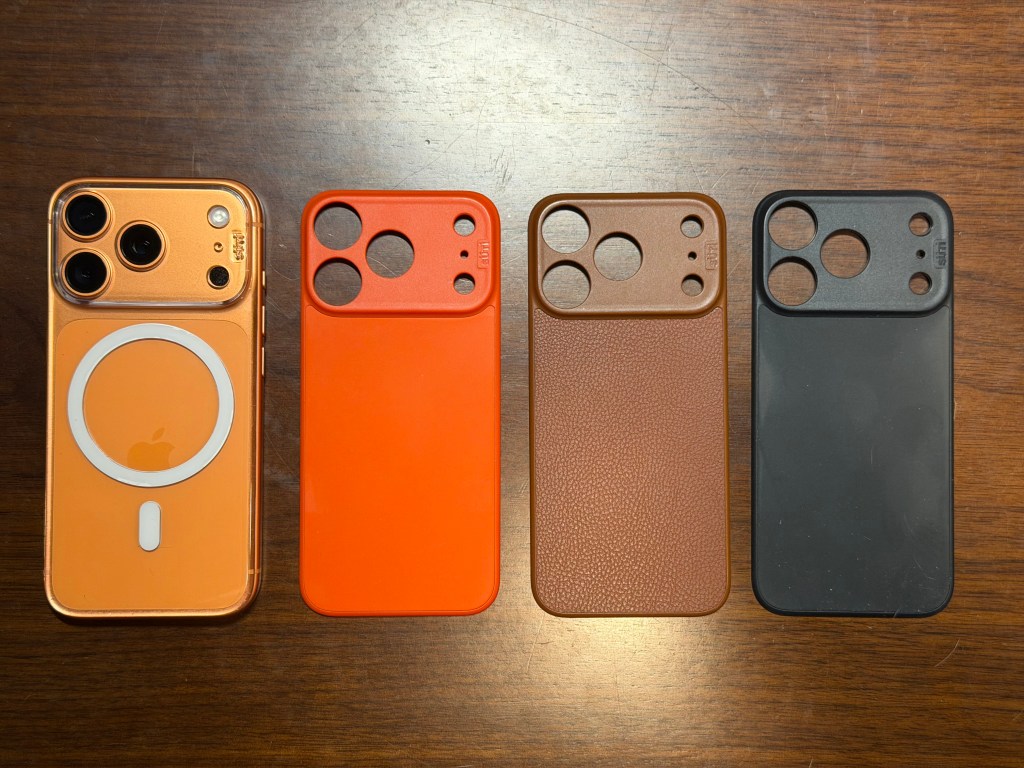
Let’s cut to the chase: the most important feature of the iPhone 17 Pro for me is the color. That’s why I bought it. 1The color is great. I’m so happy that Apple released a bold color, especially in orange, which is not what I expected. I use a Süti PhoneBack, which is a magnetic slab that only covers the back of the phone, leaving the bold orange sides visible. I have a few different versions: a clear one that shows off the color of the entire phone, a brown leather that fits nicely with the orange sides, and an orange one that makes Cosmic Orange look like a pastel.
I’m less in love with the Ceramic Shield section on the back because it is more pastel, but I’ll take what I can get. I don’t mind the switch back to aluminum, but I’d love it to be more polished ala the polished aluminum Apple Watch or the bold 5th generation iPod nano. But again, I’m thrilled Apple went bold for once and I hope this trend continues. Next year: red. Crimson. Even cranberry. PLEASE!
So what about the rest of it? I actually don’t use many of the highest-end features of the Pro line, and were it not for the color and third camera, could have dropped down to the regular iPhone this time around. But alas, Apple got me again so here I am. I’ll share my thoughts in bullet form.
- While the 17 Pro is a bit thicker and heavier than the 16 Pro, I haven’t noticed it.
- I like 4x zoom better than the 16 Pro’s 5x as 5x was just a little too much. I use 4x more and always have 8x around if I really need to zoom.
- While I don’t take selfies frequently, the landscape selfie mode and automatic rotation is genuinely useful. The dual video capture mode is cool too. I’ve tried it a little and I’m sure I’ll find more opportunities to use it.
- While I know there is a performance difference, there’s nothing that is measurable in daily use. I’m just taking photos with this thing and surfing the net, something the 16, 15, or 14 were perfectly good at.
- The screen has an enhanced ceramic coating which noticeably reduces glare. It isn’t life-changing, but it is noticeable. My glass screen protector is not ceramic coated and adds the glare back in, neutralizing this feature. I considered leaving it without a screen protector but didn’t feel comfortable exposing it to the elements so I may buy a protector with reduced glare to match it better in the future.
- While the battery is larger, I’m not seeing a significant difference in battery life. I still end the night with around 20% left in the tank. Totally fine, but also not an earth shattering improvement.
- Despite some doses of Form Over Function™, I like iOS 26’s visual flourishes2. I like the little animations that give life to the interface. I don’t find it as jarring or janky as iOS 7 was. I know I’m saying that using the latest hardware with the best performance, of course.
Overall, it’s a great phone. If you already own a 15 or 16 Pro, there’s no need to upgrade. If you own something older, you could consider it.
Apple Watch Series 10
When Apple released the Apple Watch Series 11, I struggled to understand what was different from the prior model, save for increased battery life. That turned out to be more related to a change in testing procedures than anything else anyway. As my Series 8 was nearing the 3 year mark and its battery was showing its age, I decided I would pick up the outgoing Series 10 when it went on sale. I didn’t have to wait long – 46mm Series 10 watches dropped from $429 to $309 during Amazon’s October Prime Day sale. That’s a 28% discount.
With this purchase I advance two models, resulting in display upgrades, performance increases, and new gestures.
Display
The display is larger which shows an extra line of text. The difference is far more impactful when comparing against a Series 5 or earlier, but compared to mine its minimal and I don’t really notice3. Visibility is improved, however: it can get twice as bright outdoors, is brighter at a wider viewing angle, and can get dimmer in low-light conditions. I notice the viewing angle the most and it does make it easier to glance at without raising my wrist. The screen uses less energy and is now capable of updating every second in always-on mode instead of every minute. This allows it to display seconds on analog watch faces. I don’t often use them, but it also works for timers, which is helpful.
The Case
The case is 10% thinner and 10% lighter but retains the same shape and uses the same bands. If you’re keeping track, that means bands purchased for the first Apple Watch (before it was even called a Series) still work. Bands that are eleven years old still work. Those bands even work on the Ultra, which is a different design. This backward compatibility is a welcome, and very un-Apple trend reserved only for its Watch.
I don’t notice that much of a difference in terms of weight and thickness. Some people say they notice it less on their wrist, but I didn’t notice my regular watch that much. One thing I do notice is that the Digital Crown is much harder to operate: the thinner case often jams the crown into my wrist and prevents it from turning. Its worst with tighter or stiffer bands and I often have to bend my wrist down or resituate the watch to activate the crown. This might be the first time a thinner watch case is worse for me.
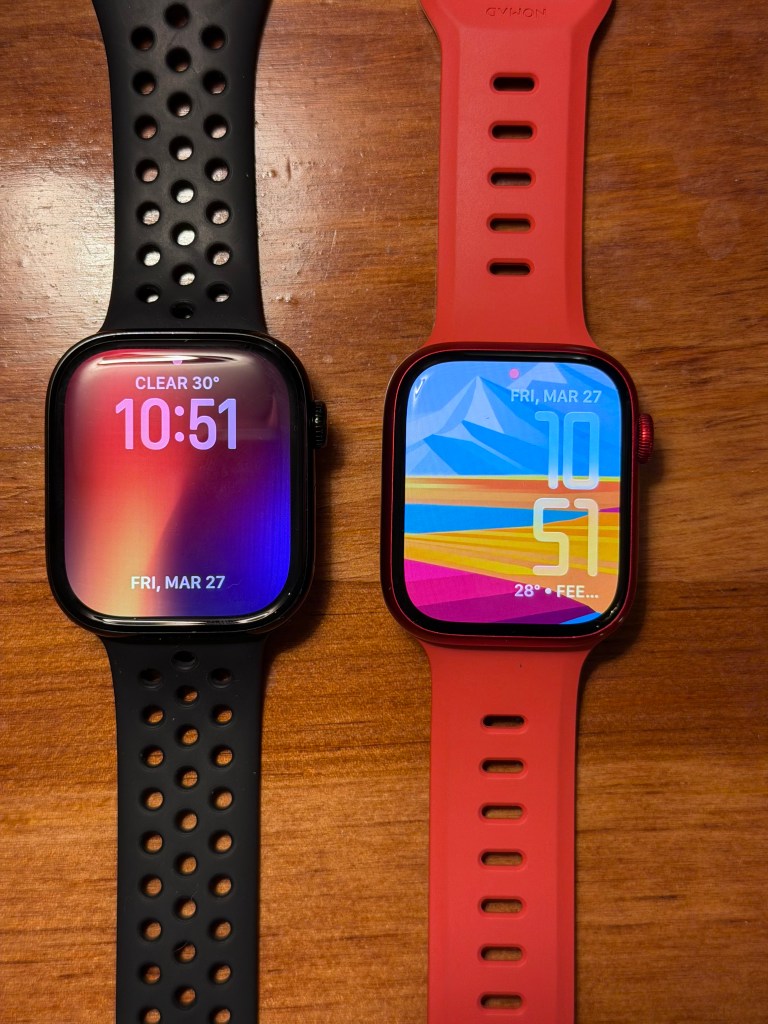
The case is available in new finishes, including a Jet Black polished aluminum, which looks really nice. It’s the same as the Jet Black finish on the iPhone 7 and reminds me of the graphite polished stainless steel finish of the Series 9 and prior. It looks very professional but costs the same as the regular aluminum cases. So far it’s durable and hasn’t scratched. The tradeoff is that it replaces the (PRODUCT) RED case option that I had on my Series 8. As much as I like Jet Black, I love(PRODUCT) RED. This is actually the reason that I keep my Series 8 charged – I still wear it occasionally.
The Rest
As with most upgrades there are changes on the inside that provide quality of life improvements, but nothing that is too transformational.
The SIP (System in Package) in the Apple Watch doesn’t advance as quickly as those in the iPhone and Mac, sometimes remaining largely the same for multiple generations4. One could argue that constant improvement isn’t necessary in a wearable and I’d tend to agree. This Series 10 does include a new S10 SIP that provides increased performance, a faster GPU, and faster Neural Engine. My Series 8 didn’t have any performance or smoothness issues running iOS 26, so I haven’t noticed any big improvements with the more powerful S10 hardware. What I have noticed is the new gestures enabled by the more powerful Neural Engine: double tap and wrist flick. I’ll get to those in a bit. The Neural Engine also allows some Siri requests to be processed on-device and improves dictation, but I haven’t noticed any difference in practice. Siri still does a great job setting timers and is utterly useless otherwise.
Rounding out the SIP is Apple’s U2 ultra-wideband chip and a storage increase to 64 GB, up from 32 GB on my Series 8. The U2 enables precise Find My locating capabilities right from the watch, which I haven’t used yet, but will be helpful if I’m trying to find my AirPods or my phone. The storage increase is nice, but it’s mainly helpful for loading music onto the watch to listen to when its away from your phone (on a run for instance). I don’t use my watch like that so I don’t store music on it. I certainly don’t have enough apps to take up the extra space either.
Outside of the SIP, the final changes include a depth gauge, which is great for diving, but not something I do. The watch charges faster, up to 80% in 30 minutes – good in a pinch but often not a situation I’m in. There’s sleep apnea detection, which is again, cool, but not something I need right now or hopefully ever. One tiny feature I might use, but just discovered, is that music can be played back through the tiny speaker on the watch. While I don’t store music on the watch, I can still stream Apple Music if I want. It sounds fine actually, though my phone is always nearby and sounds better.
The Gestures
Apple introduced a new gesture with Series 9 called Double Tap. With this gesture, you tap your index (or middle) finger and thumb together twice to select default buttons in apps or to flip through the smart stack on the home of the watch. It uses the upgraded Neural Engine to detect the motion and allows single-handed operation of the watch. In theory, this is great if your hands are full or dirty (e.g. cooking), or otherwise occupied. In reality it isn’t quite as useful as it could be.
In order to flip through the smart stack, the watch needs to be awake. This sounds obvious, but with a screen that’s always on and clearly visible from an angle, it feels like it should work any time I do it. Instead the first double tap fails, reminding me I have to twist my wrist or raise my hand more to activate the screen then try again. It isn’t terrible but it’s a bumpier experience than I’d like.
The tap also needs to be pretty strong to register. A casual “tip-tap” won’t count; you need a strong and intentional “TAP-TAP”. In addition to the Smart Stack, Double Tap can be used to invoke the default button of an app. That’s usually the button that is highlighted in a color – the orange button on the Timer app (pause / start timer) or the green button in the Workout app (start workout). It can also be used to scroll lists, but you eventually need to select something with your other hand to move forward.
The Series 11 introduced a new gesture called Wrist Flick that works almost like a shortcut for certain Double Tap scenarios: flick your wrist to dismiss timers, notifications, and alarms. It’s invoked by crisply rotating your wrist around and is intended to help when your hands are full. Luckily, and surprisingly, it was back-ported to the Series 10 as well.
It doesn’t require the watch to be raised and the screen active, so it can be used if your watch is under your sleeve. This is often the case when I want to silence a timer – I don’t need to see it, I just want it to go away. However it requires a pretty strong flick and a thorough wrist rotation. It doesn’t always trigger the first or sometimes second time and I end up dismissing by hand. After six months of practice it still only works about 50% of the time.
The Battery
I bought a new watch because the battery in mine was aging and barely lasting the day. I’m happy to say that my new watch with its fresh battery does indeed last the day, usually with 20% in the tank after two workouts. I no longer have to resort to Low Power Mode or deal with it warning me about battery life as soon as I start my workout.
Two Reviews
So that’s what I think of my new products after six months in use. As is typically the case, they are both good investments, but each illustrates a different treatment. The iPhone is routine – it’s on an upgrade program and I pay the same monthly installments all year so there’s no reason not to upgrade each generation. I buy my watches outright, waiting a generation or two before purchasing, taking advantage of closeouts on the prior generation when there aren’t huge benefits to having the latest.
In six months I’ll have a new phone but pair it with the same watch. For now I’m very happy with both.
- Well technically I didn’t buy it – I upgraded to it on the iPhone Upgrade Program and would have upgraded to whatever Pro phone Apple released anyway. ↩︎
- Note I say iOS. I do not like Liquid Glass on macOS and have yet to upgrade my system to Tahoe. ↩︎
- It provides 9% more screen space ↩︎
- Case in point: the S9 SIP in the Series 9 is largely the same as the S8 in my Series 8 ↩︎
 Relatively Ambitious